
Mole: A Mac and Windows Cleaner for Everyday Maintenance
Meet Mole, a Mac and Windows cleaner for cache cleanup, app removal, disk analysis and live monitoring. Explore features, pricing and separate platform licenses.
Affiliate disclosure: This article contains affiliate links. Buddy Apps may earn a commission if you purchase Mole through them.
A storage warning often arrives at the worst moment: before exporting a video, installing an update or starting a new project. Finding what to remove can take longer than the cleanup itself, especially when caches, old installers and application leftovers are spread across your computer.
Mole brings disk cleanup, app management, storage analysis, system maintenance and live monitoring into one desktop utility. It has separate editions for Mac and Windows, with tools designed around each operating system.
This introduction covers the features described in Mole's official documentation, checked on November 18, 2026. It is a product overview, rather than a hands-on performance benchmark.
What is Mole?
Mole is a computer maintenance app that helps you understand storage use, review removable files, manage installed software and see current system activity. Its five main areas are Clean, Software or Apps, Optimize, Analyze and Status. The Mac edition requires macOS 14 or later; the Windows edition supports Windows 10 22H2 and Windows 11, with x64 and Arm64 downloads. Check the Mac page and Windows page for current requirements.
Find removable files with context
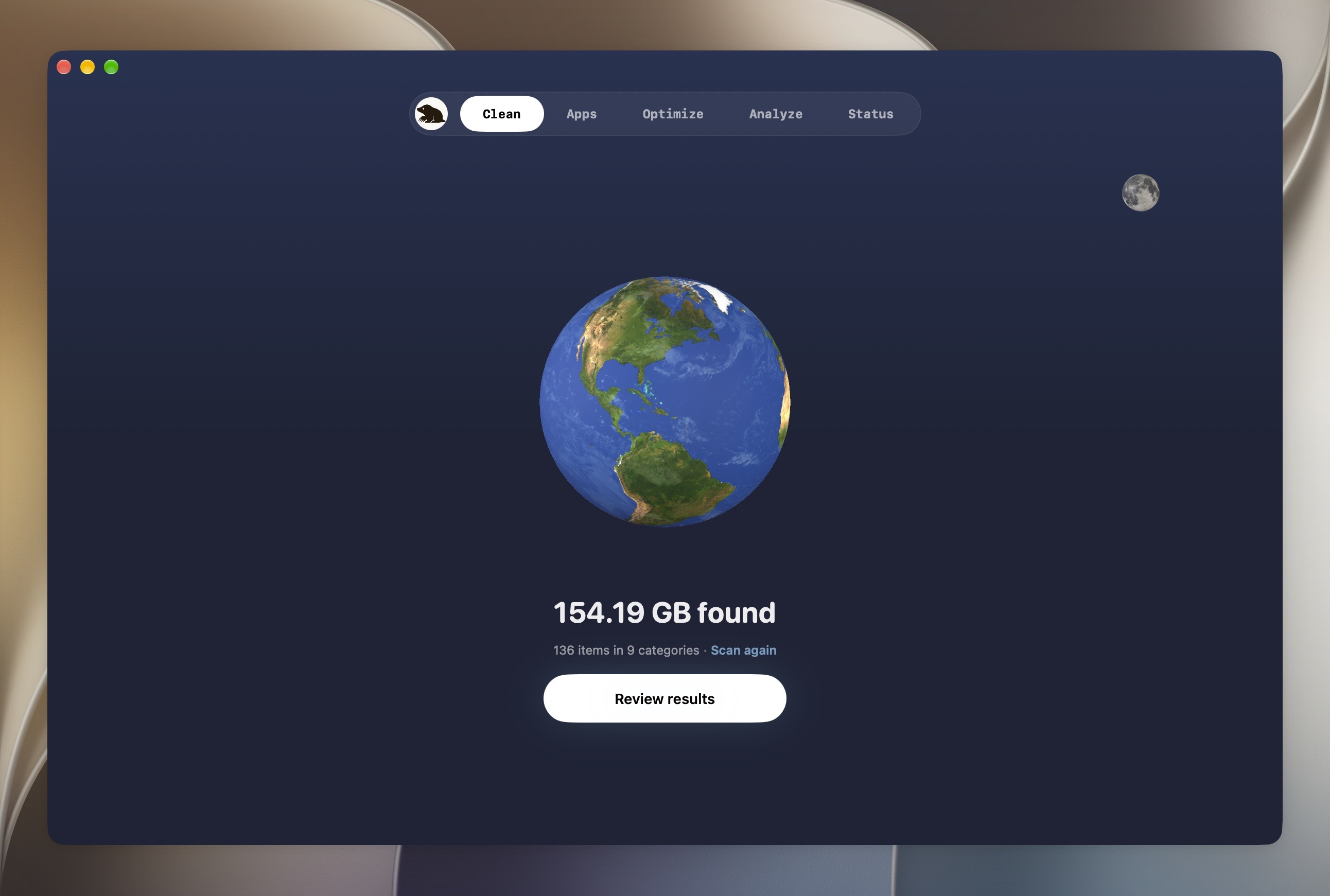
On Mac, Clean lists candidates with their paths and sizes, helping you distinguish rebuildable caches from files that would take time to replace. Developer build output and AI-tool caches are especially relevant if your work involves frequent builds or coding agents.
Mole also separates AI history from routine cleanup. Its Mac AI Cleanup & Care area provides additional review for supported old sessions and tools; ordinary cache cleanup is not a reason to discard conversations or local models. See the Mac cleanup guide for the current boundaries and removal settings.
On Windows, Clean lets you inspect cache candidates before acting. Items containing offline downloads or personal data need a separate decision, while caches belonging to running apps are skipped. This makes the review stage useful even when you decide to keep most of the results. The Windows help guide explains selection and administrator-only items.
See what is taking up disk space
Analyze turns storage use into a visual map. Larger blocks point you toward larger files and folders, giving you a starting point when you cannot explain why your drive is full.
The Mac disk analyzer lets you explore folders, reveal items in Finder and move eligible files to Trash. Protected locations remain view-only. Its documentation also explains why a folder's reported size can differ from the space a removal actually recovers. Use the map to investigate ownership before making a deletion decision. Read the disk analyzer overview.
Manage apps and their leftovers
Removing an application can leave settings, caches and support files behind. Mole's Mac Software area groups an app with proposed related files for review and also provides supported update and startup-item management. Shared or uncertain matches need attention, and software with system extensions may still require its developer's own uninstaller. The Mac app uninstaller guide describes those limits.
On Windows, Mole runs the application's own uninstaller before handling selected leftovers. Leftover files use the Recycle Bin, and registry entries are backed up before removal. The two editions follow different operating-system workflows, so their behavior should not be assumed identical. See Mole for Windows.
Monitor activity and run maintenance
Status helps answer a different question: what is the computer doing right now? On Mac, it shows resource readings and processes, with an optional menu bar view. Available battery, thermal and fan details depend on the hardware. That context can help you investigate sustained activity instead of guessing from a single CPU spike. Explore the Mac system monitor.
Windows offers live resource readings and a tray panel too. Its Optimize area handles tasks such as refreshing Search and cleaning obsolete startup entries, rather than applying bulk registry tweaks or disabling services. Check the Windows maintenance guidance before running a task.
Pricing: one-time purchases, separate platforms
At the time of writing, Mole lists each desktop edition at US$19 as a one-time purchase. A Mac license does not activate the Windows edition; the Windows license covers two PCs. Both sites advertise a 14-day refund window, and trial access is available before purchase. Confirm current prices, taxes, device limits and trial terms on the relevant product page before checkout. The free CLI is a separate option for terminal workflows, not a free license for the desktop app. See the Mac offer and Windows license details.
Does Mole upload your files?
According to Mole's privacy policy, scanning and cleaning run locally, and scanned file names, contents and results are not uploaded. Activation, updates and certain network features still contact online services. Local cleanup therefore does not mean every feature works without a network connection.
Who should consider Mole?
Mole is worth evaluating if you regularly investigate storage warnings, remove apps or switch between separate cleanup and monitoring utilities. Developers may be particularly interested in reviewing build caches; creators may find the storage map useful when deciding which old project files to archive.
Start with a scan, inspect the largest candidates and choose a small cleanup you understand. Review the result before removing more. The amount of space recovered depends on your computer and selections; this article makes no fixed storage or speed claim.
Frequently asked questions
Is Mole available for both Mac and Windows?
Yes. Mole offers separate desktop editions for supported Macs and Windows PCs. Choose the installer for your operating system and, on Windows, the correct processor architecture. See the platform downloads.
Does one Mole license cover Mac and Windows?
No. The platforms are sold separately. Review the edition and device allowance shown on the official purchase page before buying.
Is Mole free?
The desktop apps offer trial access and require a purchase for continued paid-tool use. Mole also has a free CLI for terminal workflows. Trial allowances can differ by tool and platform; consult the current product documentation.
How much space will Mole free?
That depends on which removable files exist and which you select. A scan can help identify candidates, but another user's cleanup result is not a prediction for your computer.
Ready to see what is using your storage? Explore Mole for Mac and Windows through our affiliate link, select your platform and review the available trial before purchasing.
Image credit: the official Mac Clean screenshot from the Mole website. It shows the publisher's example scan, not a result measured by Buddy Apps. The Windows interface differs.
From the studio
Explore the apps behind the writing.
Continue reading
More studio notes
September 29, 2026
TinyPOS: An Offline POS App Built for Small Shops
TinyPOS is for people looking for simple sales software that works without a constant internet connection. If you need a compact POS on your phone, TinyPOS is worth trying because it focuses on fast checkout and everyday inventory control.
Read articleSeptember 28, 2026
What if your entire POS could fit in your pocket?
That’s the idea behind TinyPOS. I built it for small shops that need to sell and manage their business — without setting up a complicated POS system.
Read articleJuly 29, 2026
A cashier scanned the same product 300 times today.
If every scan takes just one extra tap, that’s 300 unnecessary taps in a single day.
Read article